Kouncil: Soloing a Band Without Clicks or Clipping
Overview
Every spectrum chart in Kouncil doubles as a filter. If you press on one while the track plays, you only hear that part of the spectrum, which is the fastest way to find out what a bump, phase issue, or dynamic artifact at 3 kHz actually is. A band-pass filter is about as simple as DSP gets, so I expected this to be a quick feature, but it ran into two problems. The first one is well known and has a well-known fix. The second was less obvious, and has to do with how mastered audio is built.
The Feature
While you hold the mouse button on a spectrum, the horizontal position sets the center of the band and the vertical position sets its width. At the bottom of the chart the band is 7.5 octaves wide, covering most of the spectrum, and at the top it’s a tenth of an octave, about the width of a single note. The width is measured in octaves around the center, half below and half above, so the band looks the same width anywhere on the chart’s logarithmic frequency axis. My first version used the center plus or minus half the bandwidth in Hz, which was lopsided on a log axis and ran into 20 Hz at the low end.
Band charts work the same way with a press and hold, so holding on the Air band plays just the Air band.
 A drag across the Spectrum tab while a track plays. Left and right move the band, up and down change its width.
You can try it here. It’s the same filter and peak guard ported to the browser, playing 30 seconds of “Split Sights (K Presto Remix)” by Nider. The two switches turn off the fixes described below, so you can hear what each one is for.
The filter is a third-order Butterworth band-pass, run as second-order sections. It lives in Kouncil’s playback process, which hands the sound card a block of 1,024 samples about every 23 ms.
Moving a Filter Without Clicking
A filter’s output depends on its internal state, which is its memory of the last few samples it processed, and that state only makes sense for the coefficients that produced it. That means the two obvious ways to move a filter both click:
- Swap the coefficients and keep the state - The old state run through the new coefficients causes a jump in the output.
- Swap the coefficients and reset the state - The new filter starts from silence while the signal doesn’t, which is also a jump.
A drag moves the band on every block, so either approach turns into a constant crackle.
I handled this in two ways. First, the band’s edges don’t jump straight to the mouse position. On each block they move a third of the remaining distance in log frequency, so a sudden move becomes a quick glide. That covers about four fifths of the distance in four blocks, which is fast enough that stepping between bands on a band chart still sounds immediate.
Second, each step is a crossfade. For one block, the audio runs through both the old filter, with its state intact so it carries on undisturbed, and a new filter at the new edges. The output fades from the old filter to the new one across the block, and the new filter then becomes the running one. The new filter does start from silence, so its first few samples are wrong, but those samples land right where the crossfade gives it no weight, so the startup transient is hidden at no extra cost.
before, _ = signal.sosfilt(running_sos, block, axis=0, zi=running_state)
after, state = signal.sosfilt(new_sos, block, axis=0, zi=silence)
ramp = np.linspace(0, 1, len(block))[:, None]
out = before * (1 - ramp) + after * ramp
Turning the filter on and off gets its own 10 ms fade.
Why a Quieter Signal Gets Louder
Even without clicks, the audition was clipping. That seemed impossible at first, since a Butterworth band-pass has a flat passband with no resonance at its edges and never adds gain at any frequency. Filtering only removes energy, so the result should always be quieter than the input, and on average it is. The peaks are a different story.
A mastered track is limited so that all of its parts together just reach full scale. The limiter controls the sum, not the individual parts, so wherever the parts happen to cancel each other out at a peak, removing some of them removes the cancellation too. The textbook example is a square wave, whose fundamental alone peaks at 4/π of the square’s height, about 2.1 dB above the square wave it came from.
On a real master it’s even worse. On a loud drum and bass track, the full mix peaks at -0.1 dBFS, but the 200 Hz to 5 kHz band of the same track peaks at +3.1 dBFS, with more than 4,000 samples over full scale.
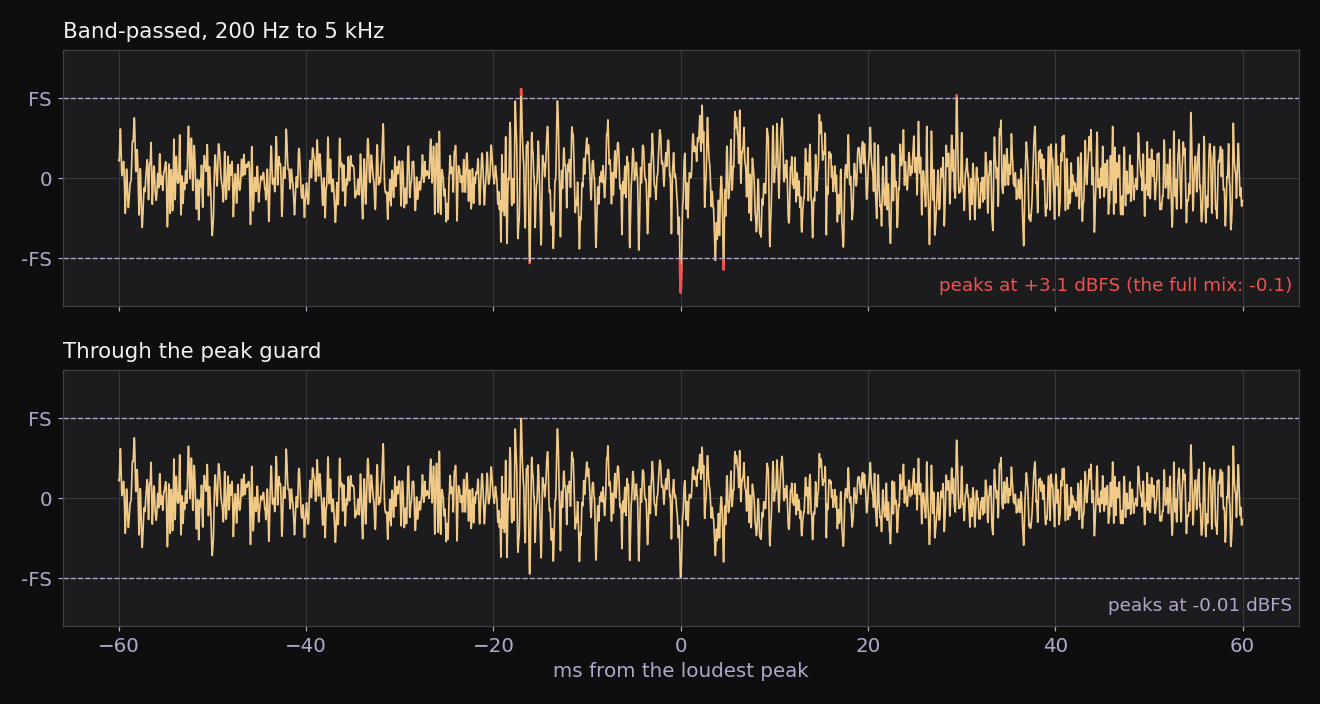 The worst 120 ms of that band, before and after the peak guard described below.
This isn’t specific to band-pass filters; a high-pass and low-pass pair overshoots the same way.
Picking a Fix
There were three obvious options, and for this feature each was worse than the problem:
- A fixed gain cut - Turning everything down by something like 6 dB whenever the filter is on lowers every band to protect against peaks only some bands have, and still isn’t enough for every track.
- Letting it clip - Hard clipping adds distortion right in the band you’re trying to listen to, which is the one thing an audition can’t do.
- Normalizing each band to its own peak - The level jumps every time the band moves, so dragging across the spectrum turns into a volume knob.
What I wanted was something that leaves the audio alone almost all of the time and only acts on the few milliseconds that would actually go over, which is a look-ahead peak limiter.
The Peak Guard
For each sample, the guard works out the gain that sample needs to stay under a ceiling of 0.999. For nearly every sample that gain is 1, and when every sample in reach is at 1, the block passes through bit for bit. Around a sample that would go over, the gain has to come down without a step, since a step in gain is a click. Two smoothing passes take care of that:
- Hold - A sliding minimum spreads each peak’s gain reduction over the 50 ms after it, so the peaks of one bass note share a single dip. A separate dip for every cycle would be distortion.
- Ramp - A moving average over the 5 ms before each peak starts bringing the gain down before the peak arrives. Each sample’s gain is an average of values that all cover that sample, so it’s never higher than the sample needs.
# Simplified: the real version carries both windows across block boundaries.
held = minimum_filter1d(needed, size=hold + lookahead + 1)   # each dip held 50 ms
gain = moving_average(held, lookahead)                       # and ramped over 5 ms
Ramping down 5 ms before a peak means the guard needs to see 5 ms into the future, so the filter runs ahead of the playhead. On each block it processes 5 ms of audio past what’s played and keeps that as the start of the next block, and a seek or a loop’s wraparound throws that read-ahead away and starts the filter fresh.
In the figure above, the guarded band peaks at -0.01 dBFS, and everything outside those few dips is untouched. The guard’s tests describe what it’s for:
- Overs are always brought under the ceiling.
- Audio under the ceiling passes through exactly, sample for sample.
- A single peak’s gain dip never steps faster than its ramp allows, and the gain is back to 1 well away from the peak on both sides.
In the end, the filter was the easy part, and most of the work went into everything around it.
Related Posts
Kouncil: Algorithm Reference
Every analysis algorithm in Kouncil, the mastering analyzer: loudness, dynamics, spectral, perceptual, stereo, codec simulation and render QC.
Kouncil: Borrowed From Radar, Sonar and Spectroscopy
Three audio problems in Kouncil that other fields had already worked through: finding clicks, telling resonances from notes, and lining up a codec's output. One of the borrowed methods didn't survive real masters.
Kouncil: Optimizing Resolution with Split FFTs
Why Kouncil's spectrum draws its low end from a second, eight times longer FFT, and the 9 dB correction that makes the two meet.
Kouncil: Where the Thresholds Come From
Why every pass/fail line in Kouncil is measured from 2,499 released masters instead of written from rules of thumb.