Inline: Out of Time - Audio Engine Overview
Quick Look:
This audio engine is structured around low-level FMOD Core for C++, with additional functionality embedded in the following classes.
AudioSystem:
System
FMOD System, master channel, primary SoundGroups, macro SoundGroup controls
AudioSource:
Component
Sound object container, playback, SoundPlaySettings, SoundGroup, positional pan
SoundGroup:
Entity
FMOD Channel Group, group playback/pan/volume, chainable
Sound:
Entity
Filedata, metadata, playback, setting randomization, subsound randomization
SoundPlaySettings:
Entity
Playback settings, SoundGroup pointer, loop count, volume, frequency, pan
PlayerSound:
Component
Behavior, player sound playback, physics-based movement sound logic
Spectrum:
Component
Finite Fourier Transform Digital Sample Processor
Features:
AudioSystem
System
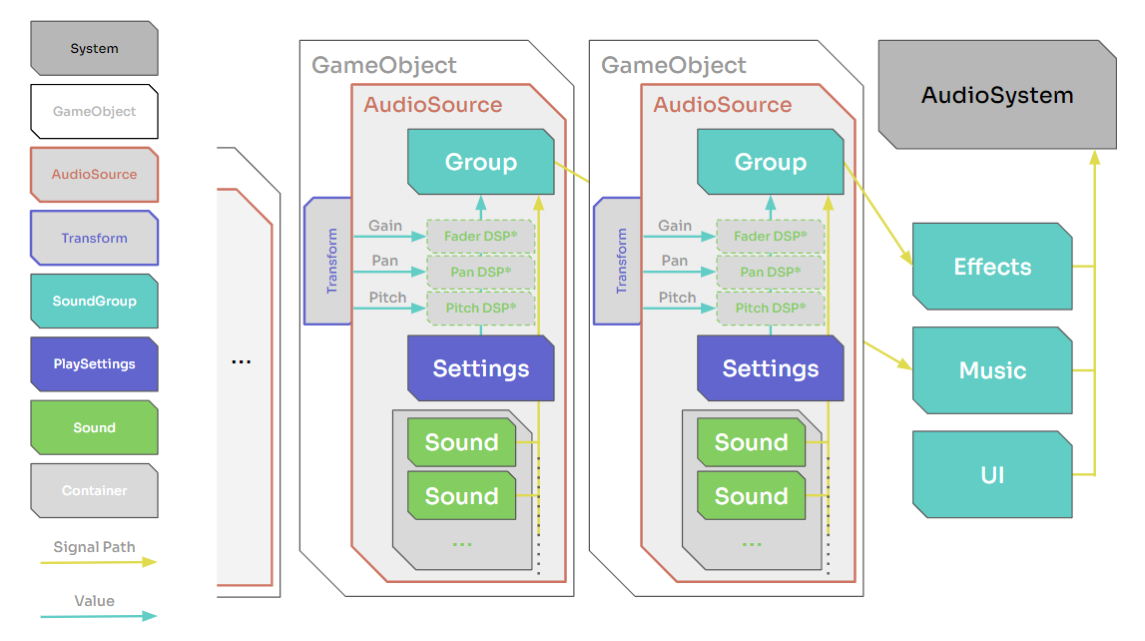
The AudioSystem object is the core of the audio engine. It manages the FMOD System instance and the master channel controls. It also contains the primary SoundGroup objects for the project (addressable with the SOUND_GROUP enum), which may serve as parent groups to facilitate macro controls such as group fades or playback commands. The master channel by default hosts a compressor DSP to control dynamic range. There should typically be only one AudioSystem at a time in the project.
- Manages FMOD System
- Manages Master channel
- Handles macro channel and Sound operations (e.g. Stop All)
- Contains the primary SoundGroup objects
- Operates as an ISystem (instanced by the Engine)
AudioSource
Component
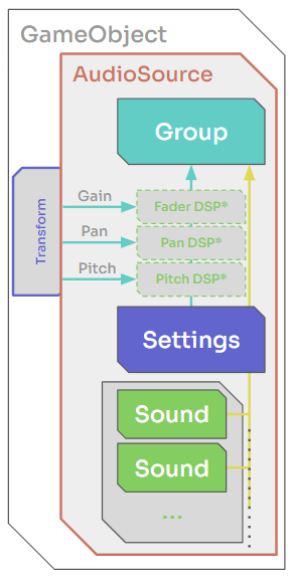
AudioSource objects are inherited from the GameObject Component class. They contain a single SoundPlaySettings object, a std::vector of Sound objects, a unique SoundGroup object in which to play those Sounds, and information for positional sound playback. They manage Sounds associated with their parent GameObject and control playback of those Sounds.
All Sounds in an AudioSource are played with that AudioSource’s SoundPlaySettings parameters. The SoundGroup in an AudioSource is a subgroup of the AudioSource::parent member, which is typically specified in object construction. The AudioSource object contains functions for setting its parent SoundGroup with either a SoundGroup or a SOUND_GROUP enum value (refer to AudioSystem primary SoundGroups).
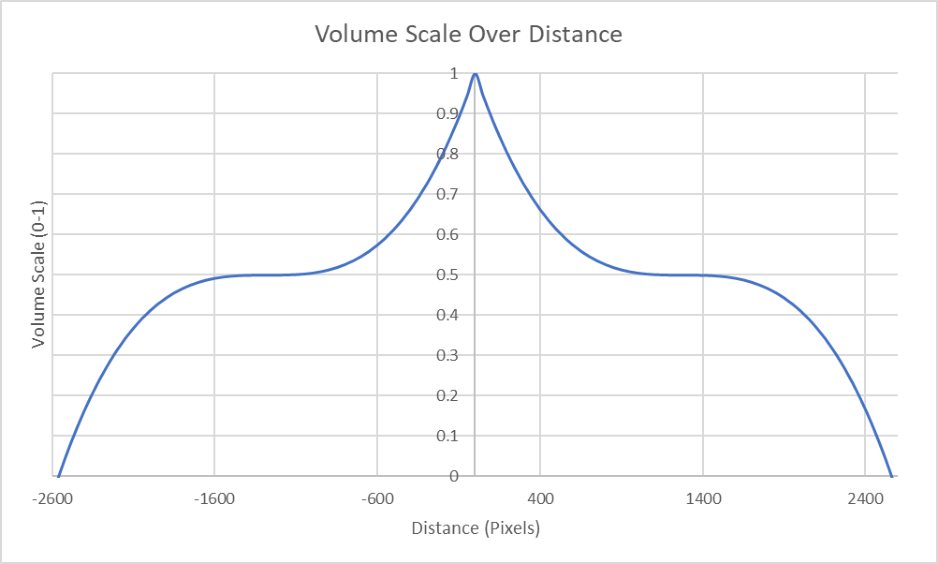
Positional sound, when enabled via the AudioSource::positional member, continuously updates the pan, volume, and pitch according to the relative position and velocity to the listener. See the Positional Sound document for details.
As an additional layer of abstraction, external modifications to AudioSource frequency and volume control fader and pitch shift DSPs, rather than modifying the actual SoundPlaySettings values.
- GameObject Component
- Manages a std::vector of Sound objects
- Controls playback of its contained Sounds
- Contains SoundPlaySettings for playback of all contained Sounds
- Contains a unique SoundGroup object for playback of all contained Sounds, typically as a subgroup of the AudioSource::parent member
- Toggleable positional pan updates, based on Parent and Listener GameObjects
SoundGroup
Entity
A SoundGroup serves as the “output” that must be selected when playing a Sound. SoundGroup objects control individual instances of FMOD Channel Groups, including channel-wide playback, volume, panning, and, most notably, level fading. SoundGroups can be chained with the SoundGroup::AddSubGroup function.
- Controls an FMOD Channel Group
- Controls channel-wide playback, volume, panning, and level fading
- Can be chained with other SoundGroups using the SoundGroup::AddSubGroup function
Sound
Entity
Sound objects are simply containers for FMOD_SOUND objects with additional sound information such as name, tempo, key, and stream status. Sounds can be played with default settings, a series of settings given as parameters, with settings stored in a SoundPlaySettings object, or with randomized settings in a specified range of deviation from a SoundPlaySettings object. Sounds are constructed from a path to a compatible audio file. If a Sound is built from an FSB (FMOD Sound Bank) file that contains multiple subsounds, the first sound is played by default, and playing that sound with randomized settings will play a random subsound from its sound bank.
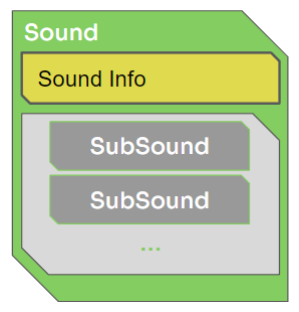
- Contains sound file data
- Contains extra sound information including name, tempo, key, and stream status
- Can be played with default settings, a series of settings given as parameters, with settings stored in a SoundPlaySettings object, or with randomized settings in a specified range of deviation from a SoundPlaySettings object
- Randomized playback from an FMOD Sound Bank file will play a random subsound
SoundPlaySettings
Entity
SoundPlaySettings objects contain settings used for Sound playback. These include a pointer to a SoundGroup output, the number of times to loop a Sound, volume, frequency multiplier, and stereo pan. By default, SoundPlaySettings objects point to the AudioSystem’s SOUND_GROUP_DEFAULT SoundGroup, do not loop, play at full volume, and do not modify frequency or pan.
- Contains settings used for Sound playback, including a pointer to a SoundGroup output, the number of times to loop a Sound, volume, frequency multiplier, and stereo pan
PlayerSound
Component
PlayerSound is a sound controller that connects player movement systems and physics to the player’s AudioSource Component. As the PlayerSound object updates, it checks the player state and triggers the appropriate logic. Each Sound in the player’s AudioSource may also have a randomness parameter associated with it, referenced during playback. While the player is in the running state, PlayerSound triggers the “run” sound from the player’s AudioSource. The run Sound logic is a special loop that crossfades and randomizes each loop iteration to minimize repetition. Run Sounds are also dynamically pitch shifted and faded according to the player’s velocity. Most other player Sounds simply play with a specified degree of randomization, triggered by player state changes. Some sound frequencies and volumes are also driven by player velocity.
PlayerSound also features an acoustic model driven by world object density. This simulates sound reflection and diffusion (echo and reverb) in response to the density of objects around the player. These effects apply to all world sounds. See the Object Density Acoustic Model document for details.
- Connects player movement systems and physics to the player’s AudioSource Component
- Checks the player state and triggers the appropriate playback logic
- Each Sound in the player’s AudioSource may also have a randomness parameter associated with it
- “Run” Sounds play in a randomized, crossfaded loop with dynamically pitch shifting and fading according to the player’s velocity
Spectrum
Component
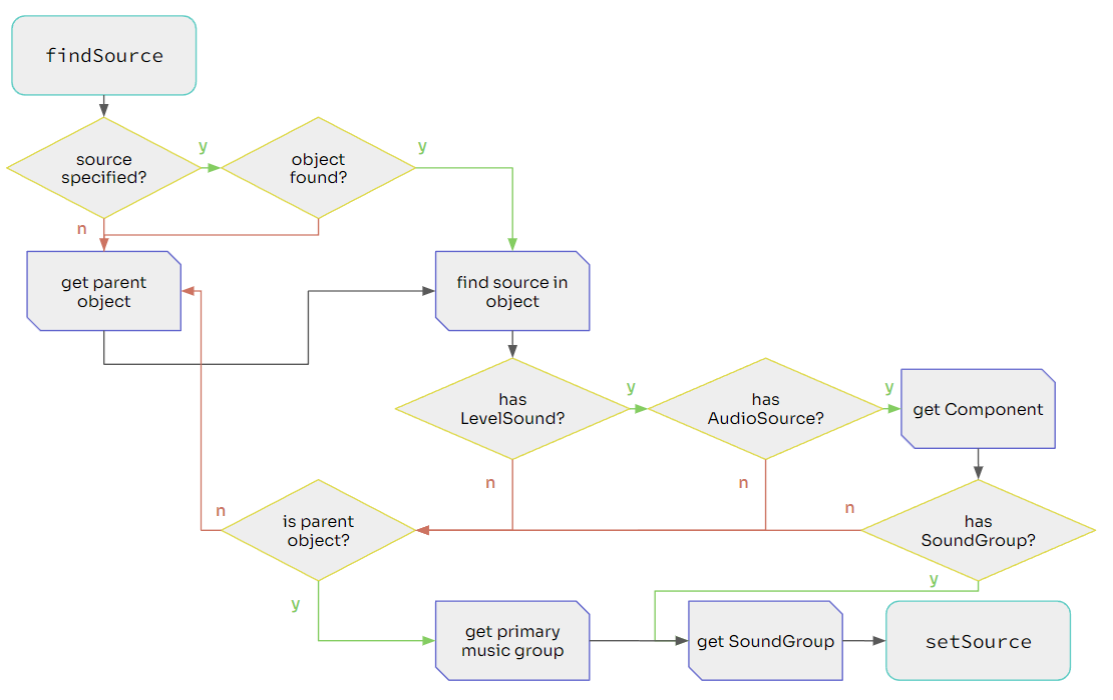
Spectrum is a GameObject Component that analyzes audio as a series of frequency bands of varying amplitudes. It does this with FMOD’s Finite Fourier Transform (FFT) Digital Sample Processor (DSP). The level of each frequency band is stored in an internal array that can be accessed by other Spectrums paired with the same SoundGroup source. When not directly paired with a source GameObject, Spectrums will automatically find a source upon initialization with the following logic.
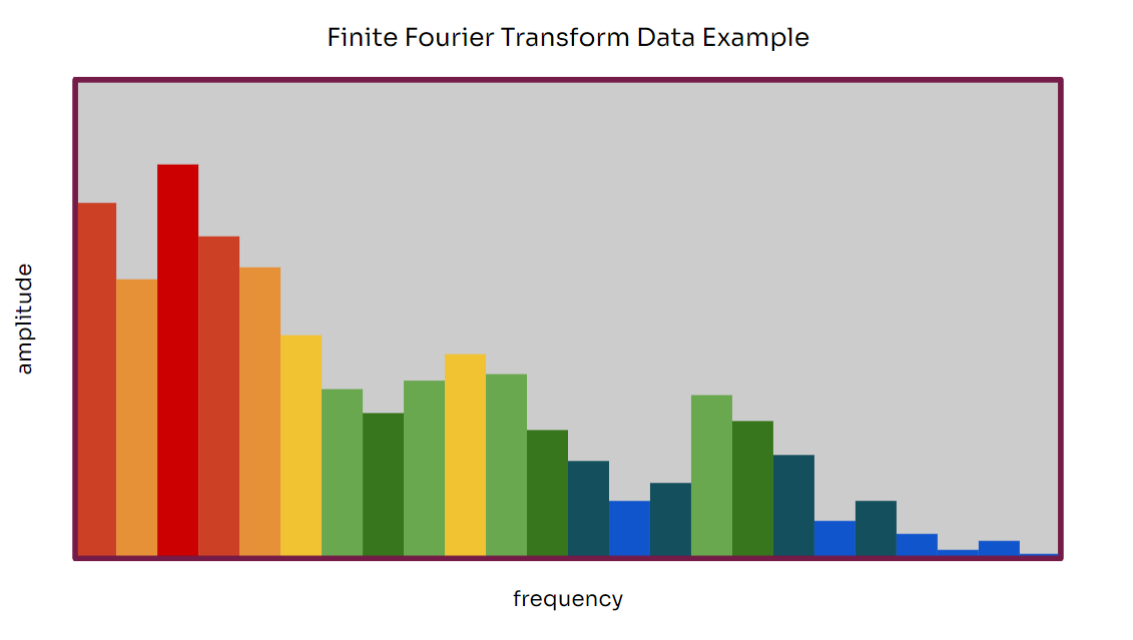
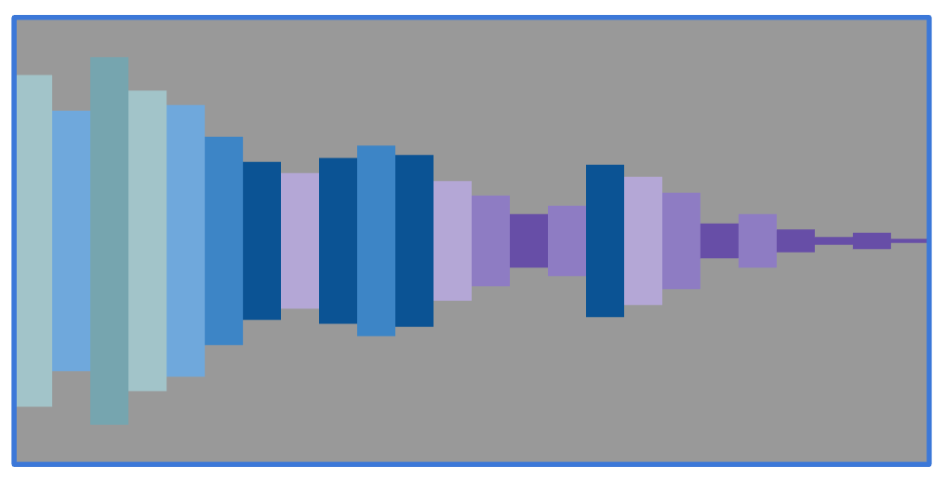
The Spectrum class has a built-in draw function that illustrates frequency bands according to the specified data resolution as colored rectangles, with the additional option of drawing a simple box around the image. This graphic can be bipolar or inverted, and each color component can be set to scale according to each frequency band’s amplitude.
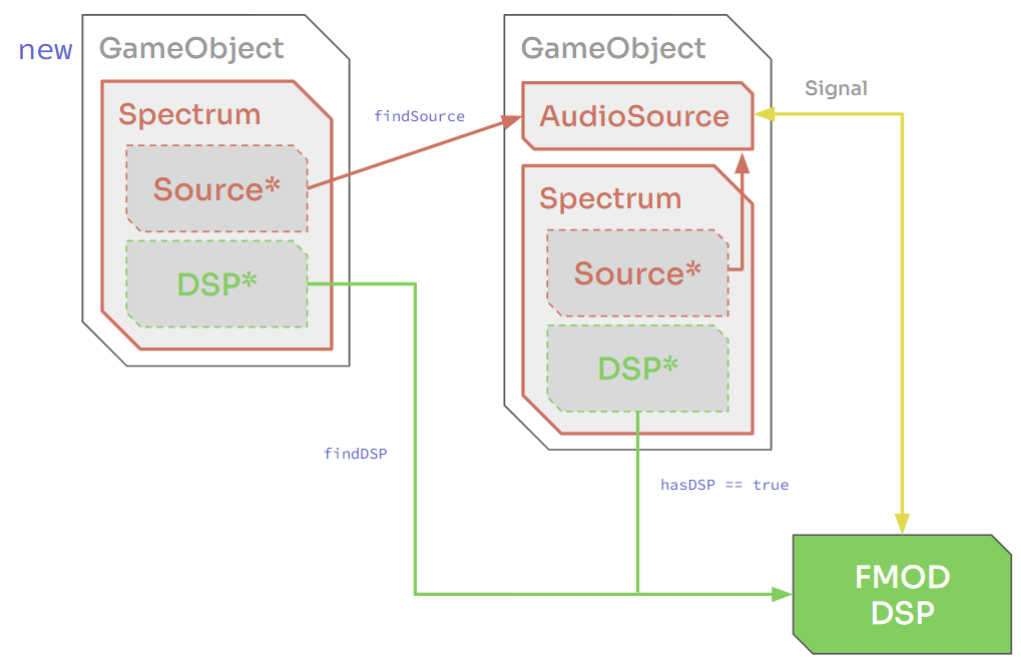
Spectrum Components share DSP data when paired with a source that already has a Spectrum Component associated with it, as illustrated above.
- Calculates frequency band amplitudes with a Finite Fourier Transform
- Automatically finds a viable audio source when not set
- Features a built-in draw function with bipolar/inverted modes and FFT data-driven colors
- Shares data with other Spectrum Components to optimize memory and processor resource usage
Files:
JSON Files
Sound | .json
| Container | Field | Type | Description |
|---|---|---|---|
Name |
String |
Name of the sound. Used only to identify JSON files. | |
Tempo |
Float |
Tempo of the sound, if applicable, in beats per minute. | |
Key |
Int |
Musical key of the sound, if applicable. Integer value indicates half-steps upward from C. | |
Stream |
Bool |
Indicates whether the sound should be streamed from the disk. - false: Load sound into memory- true: Stream sound from disk |
|
Filepath |
String |
Executable-relative filepath of the audio file. Note: this refers to the playable sound file or FMOD Sound Bank file itself, not a .json file. |
AudioSource | .json
| Container | Field | Type | Description |
|---|---|---|---|
Name |
String |
Name of the source. Used only to identify JSON files. | |
Positional |
Bool |
Indicates whether the source pan should be calculated dynamically from the parent object’s position. | |
Pan Scale |
Float |
The scale at which the pan will vary when dynamically calculated. A value of 1.0 represents a full pan over a single screen-width distance between the parent object and the listener. Negative values invert dynamic panning. This only applies when Positional is set to true. |
|
Loop Count |
Int |
The number of times to loop the source’s sound(s). A value of -1 indicates infinite looping. |
|
Volume |
Float |
The volume at which to play the source’s sound(s). Values range from 0.0 to 1.0. A default value of 0.8 minimizes the chance of clipping when multiple sounds are played simultaneously. |
|
Frequency |
Float |
Frequency multiplier of the source’s sound(s). A value of 2.0 will double the sound’s frequency, increasing the pitch by 1 octave, while a value of 0.5 will halve the sound’s frequency, decreasing the pitch by 1 octave. |
|
Pan |
Float |
The stereo pan value at which to play the source’s sound(s). A value of 1.0 will pan the sound fully to the right, while a value of -1.0 will pan the sound fully to the left. A value of 0.0 will play the sound with its original stereo balance.Note: This value is dynamically overwritten if Positional is set to true. |
|
Play on Load |
Bool |
Indicates if the AudioSource will play immediately upon initialization. | |
Listener |
String |
Name of the GameObject to set as the listener for positional pan calculation. | |
Stream |
Bool |
Indicates if the AudioSource will create its Sounds as streams, rather than loading them into memory. - false: Load Sounds into memory- true: Stream Sounds from disk |
|
Group |
String |
Sets the parent primary SoundGroup. Options are "music", "fx", or "ui". |
|
Sound |
String |
Executable-relative filepath of the sound file. This may be a playable sound file, FMOD Sound Bank, or a .json file from which to load sound data. | |
Sounds |
Array |
Array of executable-relative filepaths of sound files. These may be playable sound files, FMOD Sound Banks, or .json files from which to load sound data. | |
Sounds -> Array |
String |
Executable-relative filepath of the sound file. This may be a playable sound file, FMOD Sound Bank, or a .json file from which to load sound data. |
AudioSystem | .json
| Container | Field | Type | Description |
|---|---|---|---|
Trace Level |
Int |
Sets the level of detail to print to Trace output (Debug mode only). - 0: System creation- 1: Master Channel Group status (each frame)- 2: Primary SoundGroup statuses (each frame) |
|
Default Volume |
Float |
Default Sound volume for Sounds played from default settings. | |
Default Frequency |
Float |
Default Sound frequency multiplier for Sounds played from default settings. | |
Default Pan |
Float |
Default Sound stereo pan for Sounds played from default settings. A value of 1.0 will pan the sound fully to the right, while a value of -1.0 will pan the sound fully to the left. A value of 0.0 will play the sound with its original stereo balance. |
Spectrum | .json
| Container | Field | Type | Description |
|---|---|---|---|
Name |
String |
Name of the Component. Used only to identify JSON files. | |
draw |
Bool |
Indicates whether the Spectrum will be drawn (rather than only run FFT analysis). | |
bandCount |
Int |
Number of frequency bands to analyze. | |
xPos |
Float |
World X position (bottom left corner of Spectrum). When followParent is enabled, this value is used as the xOffset. |
|
yPos |
Float |
World Y position (bottom left corner of Spectrum). When followParent is enabled, this value is used as the yOffset. |
|
layer |
Int |
Draw layer. Overridden when followParent is enabled. |
|
layerOffset |
Int |
Draw layer offset from parent GameObject. Only applies when followParent is enabled. |
|
xOffset |
Float |
X position offset from parent object. Only applies when followParent is enabled. |
|
yOffset |
Float |
Y position offset from parent object. Only applies when followParent is enabled. |
|
xSize |
Float |
Width of the Spectrum graphic. | |
ySize |
Float |
Height of the Spectrum graphic. | |
colorScaleR |
Float |
Scaling of each frequency band’s red value with respect to that band’s data. | |
colorScaleG |
Float |
Scaling of each frequency band’s green value with respect to that band’s data. | |
colorScaleB |
Float |
Scaling of each frequency band’s blue value with respect to that band’s data. | |
colorScaleA |
Float |
Scaling of each frequency band’s alpha value with respect to that band’s data. | |
colorOffsetR |
Float |
Offset of each band’s red value (when data = 0). | |
colorOffsetG |
Float |
Offset of each band’s green value (when data = 0). | |
colorOffsetB |
Float |
Offset of each band’s blue value (when data = 0). | |
colorOffsetA |
Float |
Offset of each band’s alpha value (when data = 0). | |
dataYScale |
Float |
Vertical scaling of frequency band data. | |
dataYOffset |
Float |
Vertical offset of (scaled) frequency band data. | |
dataYMax |
Float |
Value at which to clamp frequency band data after scaling and offset. | |
dataWindowDiv |
Int |
Window division of frequency data to analyze. | |
bipolar |
Bool |
Indicates if the bands should scale both upward and downward. | |
invert |
Bool |
Indicates if the bands should scale downward. | |
followParent |
Bool |
Indicates if position should follow the transform of the parent object. | |
source |
String |
Name of the object with the audio source Component to analyze. |
Audio Files
Optimal Filetypes:
- OGG Vorbis (.ogg)
- FMOD Sound Bank (.fsb)
Supported Filetypes:
AIFF, ASF, ASX, DLS, FLAC, FSB, IT, M3U, MOD, MP2, MP3, Ogg Vorbis, PLS, S3M, WAV, WAX, WMA, XM, raw audio data
FMOD Sound Bank (.fsb):
- Subsounds are variations of that sound, selected randomly on playback.
Possible Expansions (“C Bucket”):
File System
Automatic JSON Creation
- Create and edit JSON files for all relevant audio objects with an in-engine editor
MIDI Files
- Read a MIDI file with an associated Sound and play the MIDI file using the given sound. This could be used for real-time tempo adaptation
Related Posts
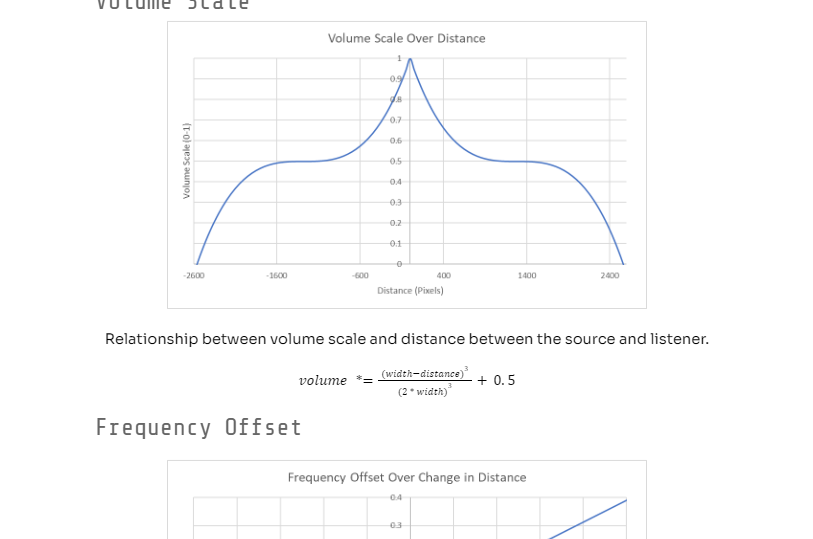
Inline: Out of Time - Positional Sound
Breaking down the formulae driving Inline: Out of Time's stereo imaging.
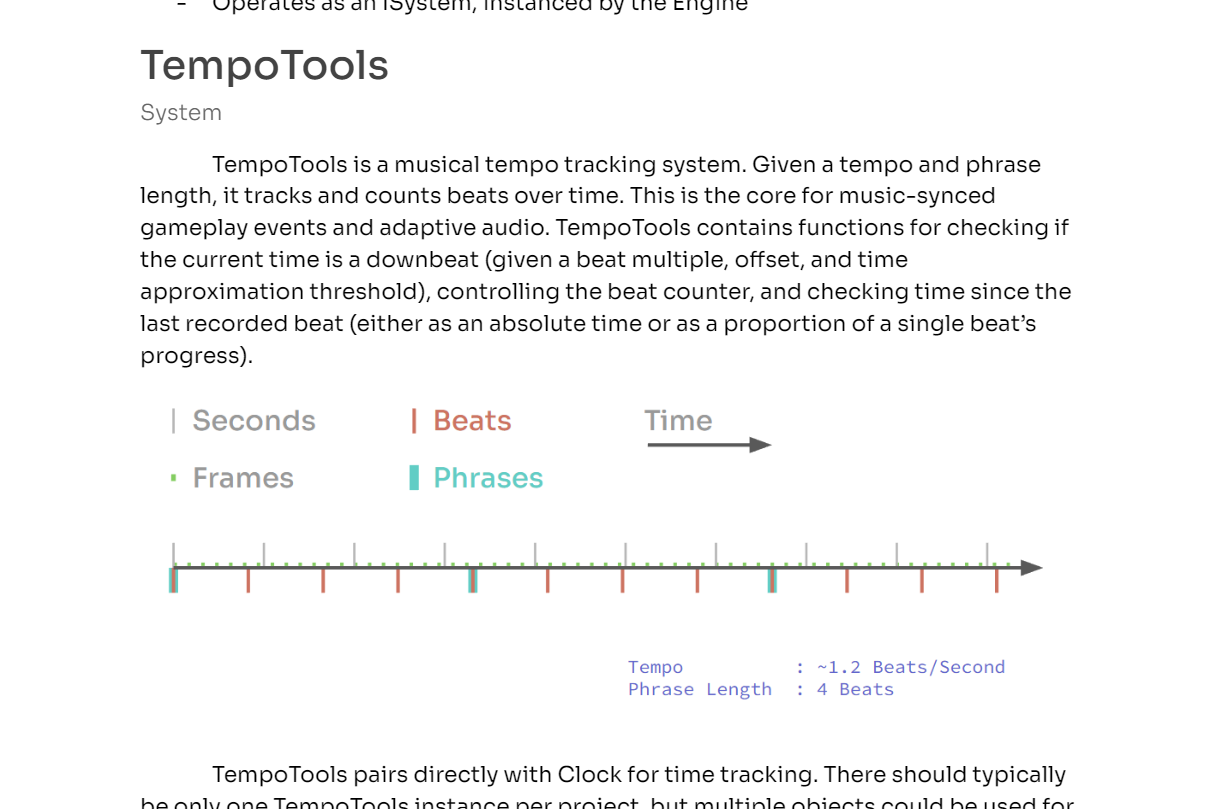
Inline: Out of Time - Adaptive Soundtrack System Overview
Architecture breakdown of Inline: Out of Time's gameplay-driven adaptive soundtrack system.

Inline: Out of Time - Object Density Acoustic Model
Deconstruction and analysis of Inline: Out of Time's highly optimized environmentally-driven acoustic model.

InfeStation: Mathematically Emotion-Driven Adaptive Music
Generative music driven by an emotional algorithm.