Inline: Out of Time - Adaptive Soundtrack System Overview
Quick Look:
MusicSource:
Component
AudioSource, score trigger threshold and playback timing for each Sound
LevelSound:
Component
MusicSource manager, queues music changes with Maestro
BehaviorMusicPlayer:
Component
Manages a “tracklist” of LevelSound Components, features playback controls
Maestro:
System
Music-based event system, TempoTools parameters in listeners
Clock:
System
Time counter
TempoTools:
System
Track beats, count beats, synced event trigger, check time against beats
Overview:
Stems
As a rough guideline, music tracks are separated into the following voice groups:
Bass
Drums 1
- Kick
- Snare
- Some cymbals
Drums 2
- Fills
- Misc FX
- More cymbals
Candy
- Any space-fillers or ornaments
Melody
- Leads
- Vocals
The LevelSound system supports tracks that contain fewer or more voice groups. This guide serves only as a convention.
Song Progression
Total score increases over time drives song progression by triggering different sounds and loops.
Velocity-Driven Effects
Each stem can have DSP effects with parameters driven by smoothed player velocity.
Features:
MusicSource
Component
MusicSource components are derived from the AudioSource class. In addition to all AudioSource and Component members, they also contain a Threshold/Division/Offset vector and an integer for iterating through that vector. The Threshold/Division/Offset vector (abbreviated to thresDivOff) contains tuples of three integers, the first representing the score threshold at which to queue a Sound with Maestro and the beat division and offset at which that Sound will play (passed to the corresponding parameters in the TempoTools::IsBeat function). Each index of the thresDivOff vector corresponds with an index in the MusicSource’s Sound vector (inherited from AudioSource).
The Component::Callback function override in MusicSource stops the current sound, increments the sound iterator, then plays the next sound in the MusicSource’s Sound vector.
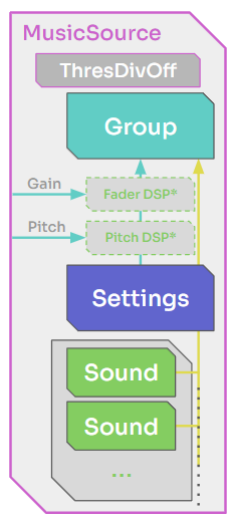
MusicSources are useful for stepping through a series of musical loops, progressing through a song structure when triggered by external inputs such as game events. LevelSound uses MusicSource components for individual audio tracks, with iteration driven by the game score.
MusicSources can have DSP effects with parameters driven by smoothed player velocity.
- GameObject Component
- Derived from AudioSource
- Each Sound in the AudioSource has three additional parameters:
- The score threshold at which to queue a Sound with Maestro
- The beat division at which that Sound will play
- The beat offset at which that Sound will play
- Useful for progressing through a song structure, triggered by external inputs such as game events
LevelSound
Component
LevelSound drives and serves as a Component Manager for MusicSource Components. Its primary purpose is to check the ScoreBoard Component for the score value and register its child MusicSource objects as Maestro listeners when their score thresholds are met.
- GameObject Component
- Drives and manages MusicSource Components
- Check the ScoreBoard Component for the score value and registers its child MusicSource objects as Maestro listeners when their score thresholds are met
BehaviorMusicPlayer
Component
MusicPlayer objects manage multiple “tracks” of LevelSound Components. They operate from a “tracklist” (read from a JSON file) with controls to skip forward, skip backward, mute, and adjust volume, similar to an MP3 player. They can also pair with their parent GameObject’s AudioSource Component to trigger sounds when skipping tracks.
- Manages a “tracklist” of LevelSound Components
- Features controls to skip forward, skip backward, mute, and adjust volume, similar to an MP3 player
- Can also pair with their parent GameObject’s AudioSource Component to trigger sounds when skipping tracks
Maestro
System
Maestro is a music-based event system. It links directly with TempoTools to trigger the Callback functions of its listeners when their TempoTools beat parameters are met. In practice, this allows for actions to be queued and triggered at musically-relevant times. This could include musical transitions in an adaptive soundtrack system, visual effects to accompany music changes, or gameplay events timed to align with key musical moments.
- Music-based event system
- Triggers the Callback functions of its listeners when their TempoTools beat parameters are met
- Allows for actions to be queued and triggered at musically-relevant times
Clock
System
Clock is a basic timer object. It counts elapsed time and contains functions for pausing, resuming, resetting, and checking time. Clock operates as an ISystem, instanced by the Engine.
- Basic timer object that counts elapsed time
- Contains functions for pausing, resuming, resetting, and checking time
- Operates as an ISystem, instanced by the Engine
TempoTools
System
TempoTools is a musical tempo tracking system. Given a tempo and phrase length, it tracks and counts beats over time. This is the core for music-synced gameplay events and adaptive audio. TempoTools contains functions for checking if the current time is a downbeat (given a beat multiple, offset, and time approximation threshold), controlling the beat counter, and checking time since the last recorded beat (either as an absolute time or as a proportion of a single beat’s progress).
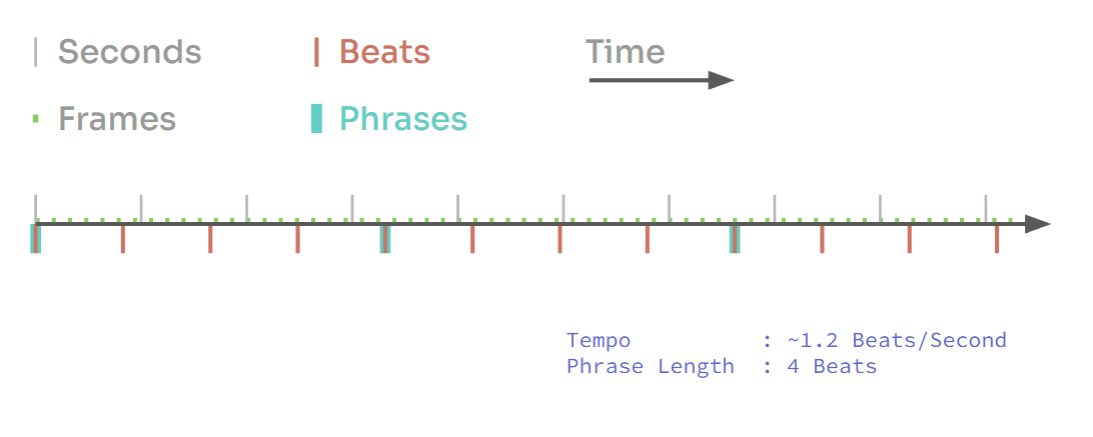
TempoTools pairs directly with Clock for time tracking. There should typically be only one TempoTools instance per project, but multiple objects could be used for subdivisions, unsynced tempo counters, or simultaneous tempo counters at an offset.
- Tracks and counts beats over time
- Core for music-synced gameplay events and adaptive audio
- Contains functions for checking if the current time is a downbeat
- Contains functions for checking time since the last recorded beat
- Pairs directly with Clock for time tracking
Files:
JSON Files
LevelSound | .json
| Container | Field | Type | Description |
|---|---|---|---|
Music Sources |
Array |
Array of Arrays, each representing a MusicSource object to load. | |
Music Sources |
Array |
MusicSource to load. | |
Music Sources -> Array |
String |
Filepath to an AudioSource JSON file from which to create the MusicSource. | |
Music Sources -> Array |
Int |
The score threshold at which to register the MusicSource as an active Maestro listener. | |
Music Sources -> Array |
Int |
The TempoTools beat division at which Maestro will trigger the MusicSource’s Callback function. | |
Music Sources -> Array |
Int |
The TempoTools beat offset at which Maestro will trigger the MusicSource’s Callback function. | |
Tempo |
Float |
Tempo at which to set TempoTools upon LevelSound initialization. | |
Phrase Length |
Int |
Phrase length at which to set TempoTools upon LevelSound initialization. | |
Text |
String |
Optional text associated with the LevelSound Component, often the track title. |
MusicSource | .json
| Container | Field | Type | Description |
|---|---|---|---|
Name |
String |
Name of the source. Used only to identify JSON files. | |
Positional |
Bool |
Indicates whether the source pan should be calculated dynamically from the parent object’s position. | |
Pan Scale |
Float |
The scale at which the pan will vary when dynamically calculated. A value of 1.0 represents a full pan over a single screen-width distance between the parent object and the listener. Negative values invert dynamic panning. This only applies when Positional is set to true. |
|
Loop Count |
Int |
The number of times to loop the source’s sound(s). A value of -1 indicates infinite looping. |
|
Volume |
Float |
The volume at which to play the source’s sound(s). Values range from 0.0 to 1.0. A default value of 0.8 minimizes the chance of clipping when multiple sounds are played simultaneously. |
|
Frequency |
Float |
Frequency multiplier of the source’s sound(s). A value of 2.0 will double the sound’s frequency, increasing the pitch by 1 octave, while a value of 0.5 will halve the sound’s frequency, decreasing the pitch by 1 octave. |
|
Pan |
Float |
The stereo pan value at which to play the source’s sound(s). A value of 1.0 will pan the sound fully to the right, while a value of -1.0 will pan the sound fully to the left. A value of 0.0 will play the sound with its original stereo balance.Note: This value is dynamically overwritten if Positional is set to true. |
|
Play on Load |
Bool |
Indicates if the AudioSource will play immediately upon initialization. | |
Listener |
String |
Name of the GameObject to set as the listener for positional pan calculation. | |
Stream |
Bool |
Indicates if the AudioSource will create its Sounds as streams, rather than loading them into memory. - false: Load Sounds into memory- true: Stream Sounds from disk |
|
Group |
String |
Sets the parent primary SoundGroup. Options are "music", "fx", or "ui". |
|
Sound |
String |
Executable-relative filepath of the sound file. This may be a playable sound file, FMOD Sound Bank, or a .json file from which to load sound data. | |
Sounds |
Array |
Array of executable-relative filepaths of sound files. These may be playable sound files, FMOD Sound Banks, or .json files from which to load sound data. | |
Sounds -> Array |
String / Int |
Executable-relative filepath of the sound file. This may be a playable sound file, FMOD Sound Bank, or a .json file from which to load sound data. Note: A non-string value in this field will be treated as a sequenced period of silence. |
|
TDO |
Array |
Array of threshold, division, and offset parameters for adaptive soundtrack triggering for a single Sound. When this is a single-level array of only one TDO set, there should only be one Sound, else only the first Sound in the Sounds array will trigger. | |
TDO |
Array |
Array of threshold, division, and offset parameters for adaptive soundtrack triggering for each Sound in the Sounds array. | |
TDO -> Array |
Array |
Threshold, division, and offset parameters for adaptive soundtrack triggering for the Sound in the Sounds array of the same index. | |
TDO -> Array -> Array[0] |
Int |
Score threshold at which the Sound in the Sounds array of the same index will queue. | |
TDO -> Array -> Array[1] |
Int |
Beat division at which the Sound in the Sounds array of the same index will start playback. | |
TDO -> Array -> Array[2] |
Int |
Beat offset at which the Sound in the Sounds array of the same index will start playback. |
BehaviorMusicPlayer | .json
| Container | Field | Type | Description |
|---|---|---|---|
MusicManifest |
Array |
Array of track filepaths from which to create LevelSound Components. | |
MusicManifest -> Array |
String |
Track filepath from which to create a LevelSound Component. | |
Track |
Int |
Index in the MusicManifest of the first track to load/play. |
Possible Expansions (“C Bucket”):
Randomized DSP Effects
- Optional: randomized DSP effects for variation
- Reverb
- Filtering
Gameplay Triggering
- Little “riffs” triggered by gameplay
- Could be their own instrument e.g. guitar (easier but might get muddy)
- If they are an existing instrument in the soundtrack, we would need to duck the appropriate stem for the duration of the riff (harder)
Score Rate
- Number of simultaneous stems directly correlates with rate of score increase
- Tricks, speed will increase music layering
- Idle (standing still)
- Just drums?
- Moving, no jumps
- Drums and bass
- Moving faster / jumping
- Drums, drums 2, bass, candy
- Moving fast, tricks
- Drums, bass, candy, melody/vocals
- Idle (standing still)
- These layers could shuffle to give the song variation. Maybe even randomly?
- Gradual transition effects could be triggered by delta score trends (e.g. the player is completing multiple consecutive tricks so the music could swell, the player is slowing down so a low-pass filter gradually applies)
- Tricks, speed will increase music layering
Related Posts

Inline: Out of Time - Object Density Acoustic Model
Deconstruction and analysis of Inline: Out of Time's highly optimized environmentally-driven acoustic model.
Inline: Out of Time - Audio Engine Overview
An overview of the powerful audio engine behind Inline: Out of Time's rich soundscape and audio-driven visuals.
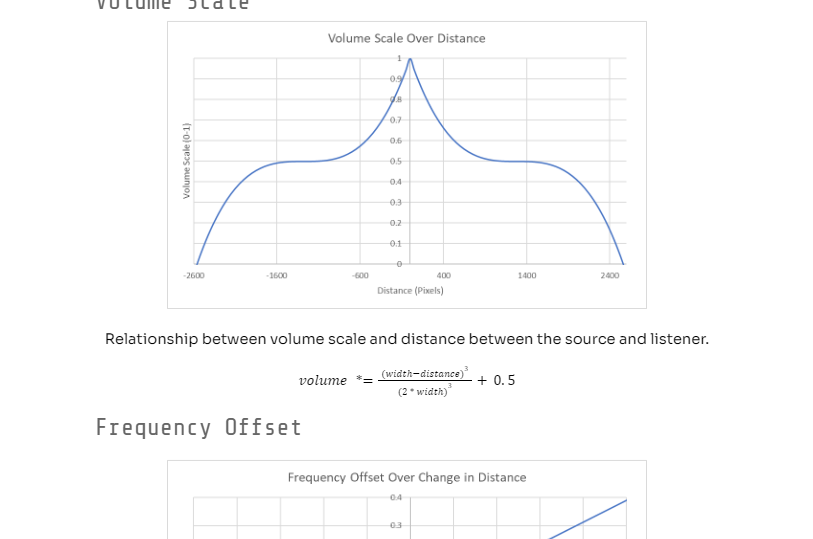
Inline: Out of Time - Positional Sound
Breaking down the formulae driving Inline: Out of Time's stereo imaging.
InfeStation: Mathematically Emotion-Driven Adaptive Music
Generative music driven by an emotional algorithm.